
At a glance
All three are free and most people already have them. The difference is what happens once people start signing up: who can see the list, and whether a full slot stops taking names.
| Docs | Sheets | Forms | Kitokoto | |
|---|---|---|---|---|
| Everyone sees who signed up | Yes | Yes | No | Yes, or only you |
| A slot closes when it's full | No | No | Only with an add-on | Yes |
| Names can't be overwritten | No | No | Yes | Yes |
| Signing up without a Google account | Yes | Yes | Yes, unless limited to one response | Yes |
| Easy to fill in on a phone | Fiddly | Fiddly | Yes | Yes |
We make Kitokoto, so read that column with that in mind.
In Google Docs
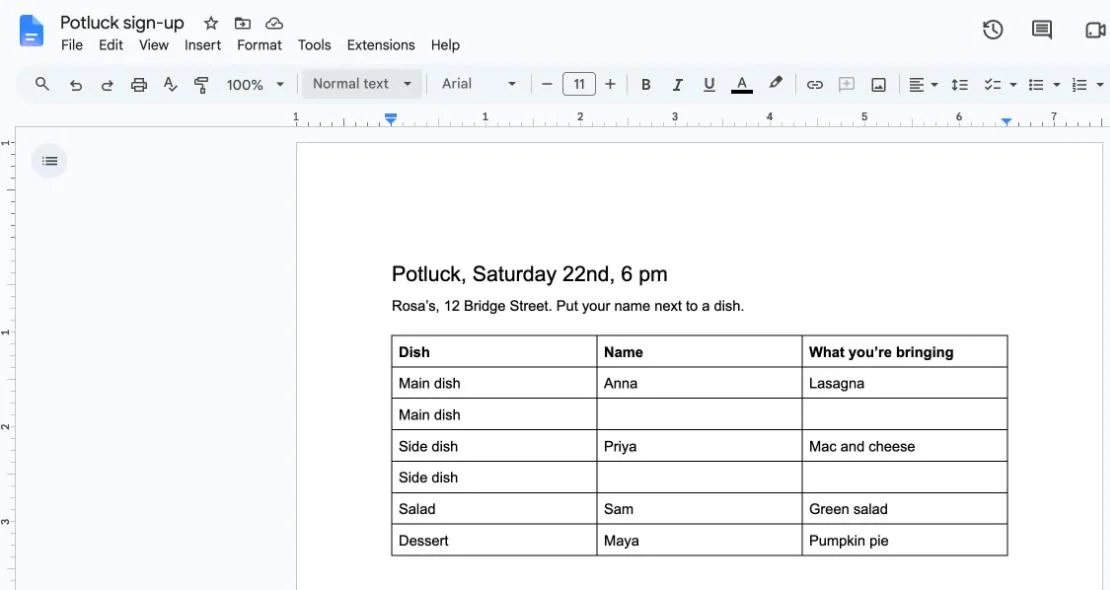
Best for a short list among friendsA doc with a table takes a few minutes to set up. Everyone can see the list and add their name in the next empty row.
- 1Open a new document at docs.new and give it a title with the event, the date and the time.
- 2Choose Insert, then Table, with columns like Dish, Name and Notes. Or copy a layout from further down this page.
- 3Add one row per place. A dish you need three of gets three rows.
- 4Choose Share, set General access to Anyone with the link and the role to Editor, then send the link.
In Google Sheets
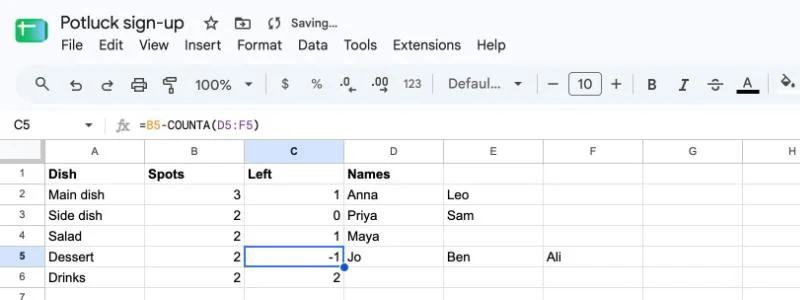
Best when you want countsA spreadsheet does the same job as a doc, plus it can count. A column of spots left shows at a glance what still needs someone.
- 1Open a new spreadsheet at sheets.new. Put the slots in column A, the spots for each in column B, and leave columns D onwards for names.
- 2In C2, count what’s left with =B2-COUNTA(D2:F2), then copy it down the column.
- 3Freeze the top row with View, Freeze, 1 row. To stop columns A to C being edited, use Data, Protect sheets and ranges.
- 4Share it the same way as a doc, with anyone who has the link as an editor.
In Google Forms
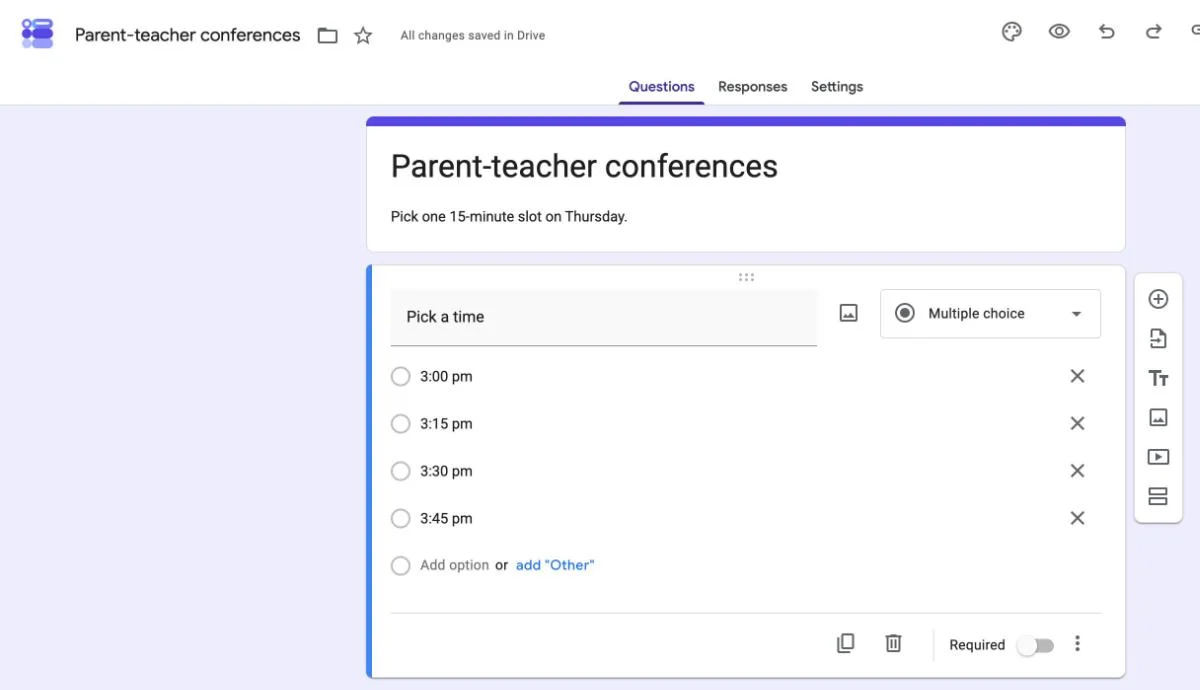
Best when answers should stay privateA form works well on a phone, and nobody can touch anyone else’s answer. The trade-off is that people can’t see the list, and Forms has no way to close a slot once it’s taken.
- 1Open a new form at forms.new. Add a short-answer question for the person’s name and make it required.
- 2Add a multiple-choice question with one option per slot, such as each time or each dish.
- 3Choose Send, copy the link and share it. Answers collect in the form, or in a sheet you link to it.
- 4To close an option once it’s taken, add a choice-limit add-on from the Google Workspace Marketplace. Otherwise, check the answers and remove full options by hand.
Which one to use
Google Docs for a short list among people you trust, where seeing the names matters more than the numbers.
Google Sheets when you want counts and you’ll keep an eye on it yourself.
Google Forms when answers should stay private, like phone numbers or allergies, and you can handle full slots by hand.
Kitokoto when a slot should close once it’s full, people need to see what’s left, and most of them will sign up on a phone.
Layouts to copy
Pick a layout and copy it. It pastes into Google Docs as a table and into Google Sheets as cells, ready to rename and share.
| Dish | Name | Notes |
|---|---|---|
| Green salad | ||
| Green salad | ||
| Main dish | ||
| Main dish | ||
| Main dish | ||
| Side dish | ||
| Side dish | ||
| Dessert | ||
| Dessert | ||
| Bread | ||
| Drinks | ||
| Drinks | ||
| Plates, cups and napkins |
The easier way
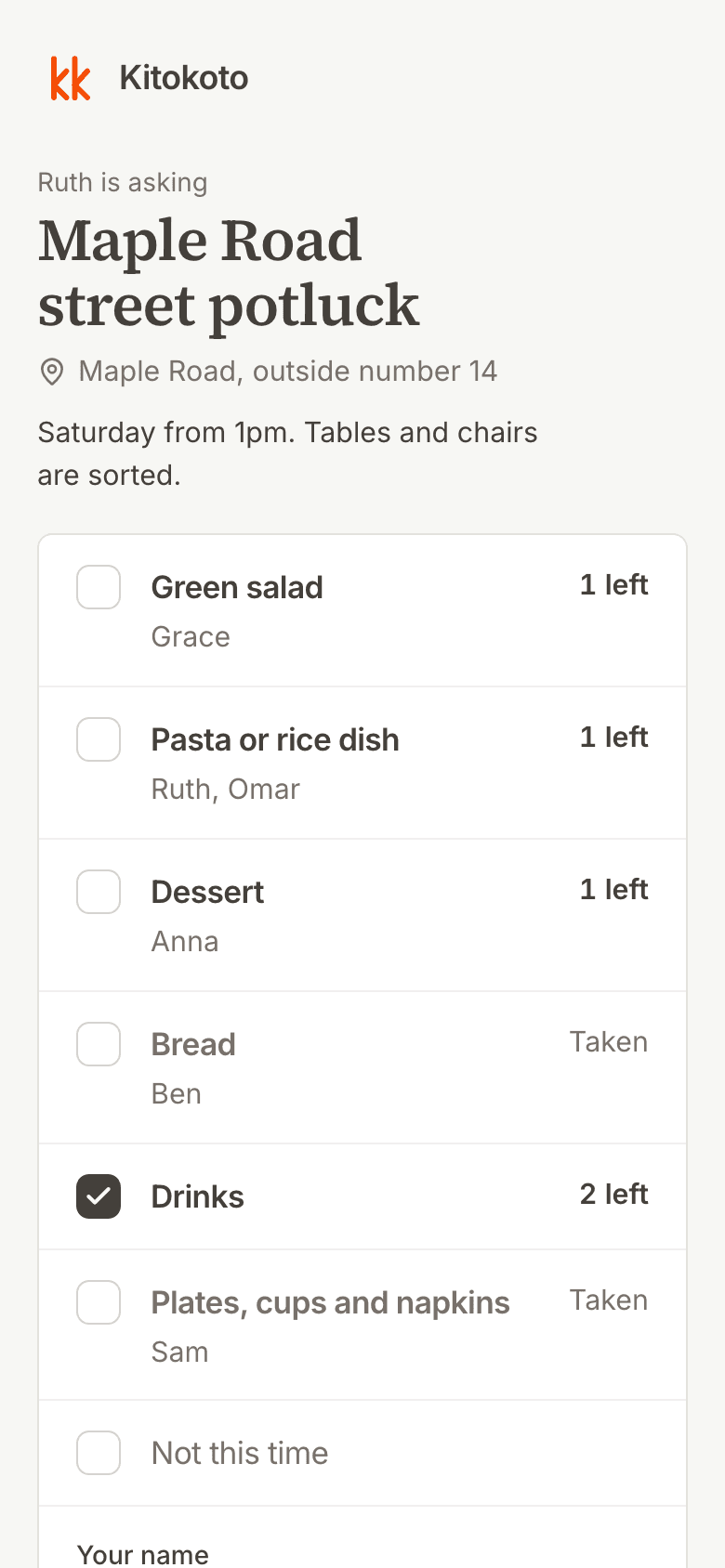
A shared doc lets anyone overwrite a name, and a form can’t close a full slot. Kitokoto is a sign-up sheet where each slot closes when it’s full and nobody can overwrite anyone else. Free, no account.
- Everyone sees what's taken and what's left.
- Each slot takes as many names as you set, and no more.
- Signing up takes a name, on any phone.
Questions
- How do I make a sign-up sheet on Google Docs?
- Insert a table with a column for the slot and one for the name, then share the doc so anyone with the link can edit.
- Does Google have a sign-up sheet template?
- Not one built into Docs or Sheets. You can paste one of the layouts on this page and change the rows.
- How do I make a potluck sign up sheet on Google Docs?
- Make a table with Dish, Name and Notes, and give each dish as many rows as you need of it. Three mains means three rows. Or use a potluck sign-up sheet.
- Can I use Google Forms as a sign-up sheet?
- Yes, with a multiple-choice question for the slots. People can't see who else signed up, and a full slot stays open unless you add an add-on.
- Does Google Forms have a sign-up feature?
- No dedicated one. A form with a name question and a list of slots does the job, and responses collect in a linked sheet.
- How do I create a signup sheet in Google Forms with time slots?
- Add a multiple-choice question with one option per time. To close a time once it's taken, install a choice-limit add-on from the Google Workspace Marketplace.
- How do I limit responses in Google Forms?
- Forms itself can only limit each person to one response, which makes everyone sign in with Google. Limits per option or in total need an add-on, or closing the form by hand.
- Can people sign up without a Google account?
- Yes, in a doc or sheet shared with anyone who has the link, and in a form that isn't limited to one response. Signed-out people show up as anonymous animals in a doc.
Sign-up sheets for
- Potluck sign-up sheetWho brings which dish, with enough of each.
- Volunteer sign-up sheetShifts and jobs for a fair or a fundraiser.
- Time slot sign-up sheetOne person per slot, closed when taken.
- Parent-teacher conferencesTimes for each family.
- Snack sign-up sheetWho brings snacks to each game.
- All sign-up sheet templatesEvery layout, ready to change.